The People Behind the Partnerships
Brokerages are the foundation of the network, but agents are the individuals who actually work with relocating families. They’re the ones answering questions about school districts, scheduling home tours, and guiding families through the biggest purchase of their lives.
The Agents Management page gives you oversight of every agent in the network—who they are, which brokerage they work with, and whether they’re active and ready to receive leads.
See Your Agent Roster
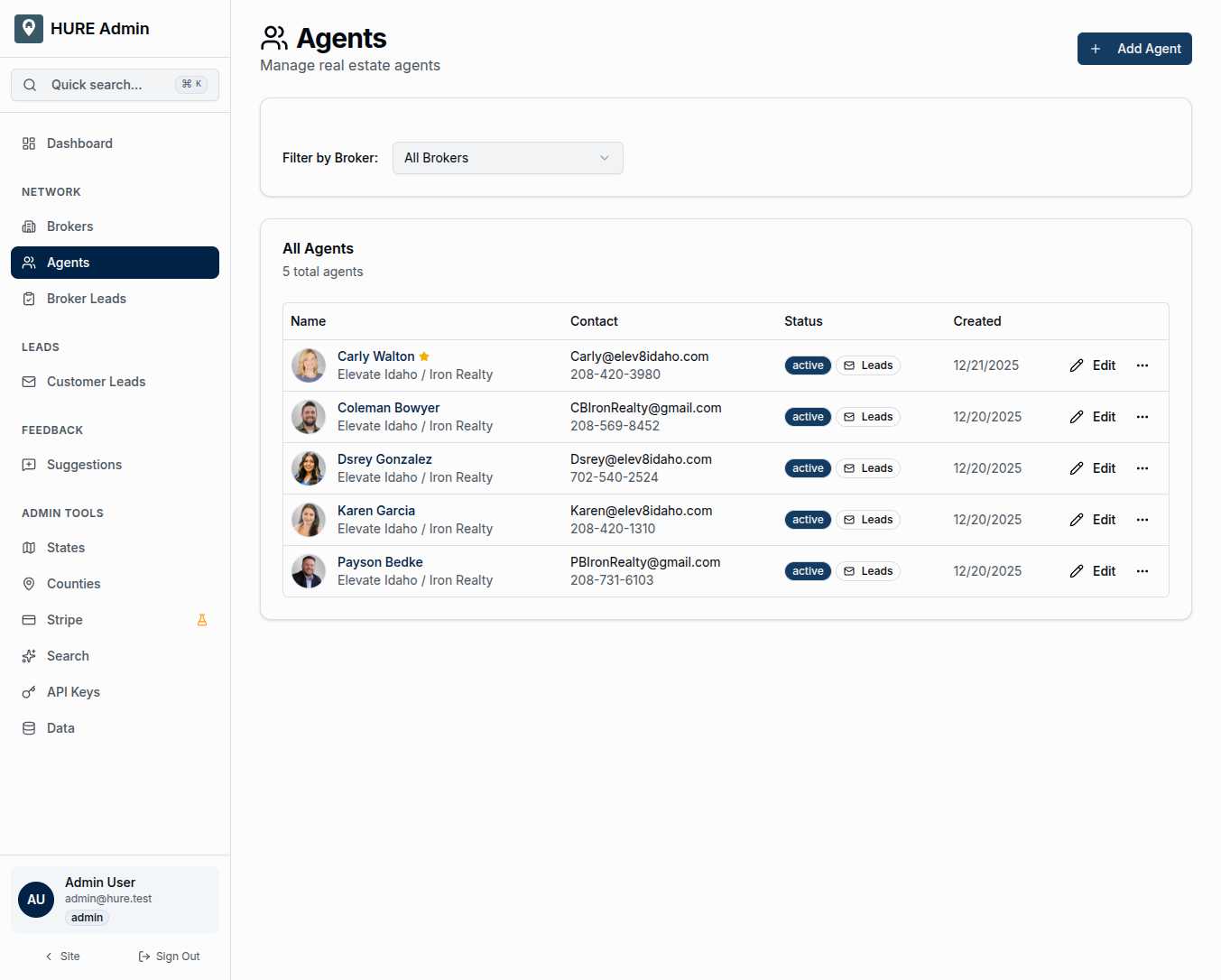
The main view presents every agent in a clear, scannable table:
Avatar and Name give you quick identification. A star indicator highlights featured agents who’ve earned enhanced visibility.
Brokerage Association shows which company each agent works with. Click through to see their full team.
Contact Information displays email and phone at a glance. When you need to reach someone quickly, it’s right there.
Status Badges tell you what’s important:
- “Active” means the agent is in the system and ready to work
- “Leads” indicates they have lead access enabled for receiving customer inquiries
Created Date shows when the agent joined the network, helpful for understanding your team’s growth over time.
Filter to Focus
When managing agents across multiple brokerages, the filter dropdown helps you focus:
All Brokers shows the complete roster—every agent across the entire network.
Specific Brokerage narrows to just one team. Managing Elevate Idaho’s agents? Filter to see only their roster.
This becomes essential as the network grows. Dozens of brokerages with multiple agents each means potentially hundreds of records. Filtering lets you work efficiently.
Agent Profiles in Detail
Click into any agent to see their full profile:
Basic Information includes their name, email, phone, and optional website. Contact details flow through to the admin panel and potentially to family-facing displays.
Photo and Biography power the agent’s public presence. A good bio helps families understand who they’re working with before they ever make contact.
Status Controls let you toggle three important settings:
- Active — is this agent currently in the system?
- Featured — should this agent receive enhanced visibility?
- Lead Access — can this agent receive customer inquiries?
Each toggle takes effect immediately. No save button, no delay.
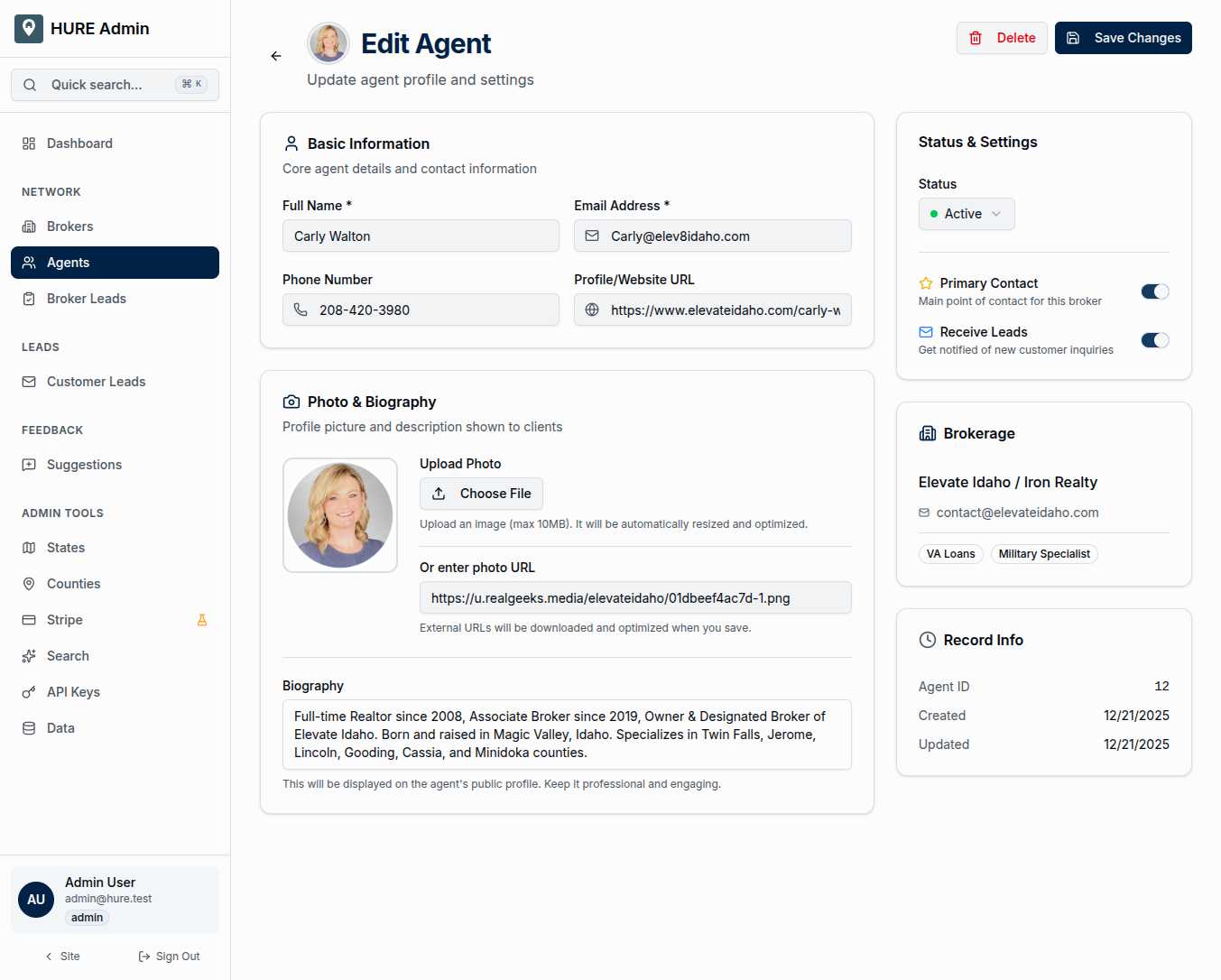
Sidebar Information provides context without cluttering the main form:
- Current status badges at a glance
- Link to the agent’s brokerage
- Record metadata (when created, when last updated)
The Brokerage-Agent Relationship
Agents don’t exist in isolation. Each one belongs to a brokerage:
Brokerage (e.g., "Elevate Idaho / Iron Realty")
└── Agent 1 (Carly Walton)
└── Agent 2 (Coleman Bowyer)
└── Agent 3 (Dsrey Gonzalez)
└── Agent 4 (Karen Garcia)
└── Agent 5 (Payson Bedke)
This hierarchy matters for lead routing. When a family submits an inquiry for a county covered by Elevate Idaho, the lead can be assigned to any agent on that team based on availability, specialization, or broker preferences.
Growing the Team
The “Add Agent” button opens the creation form, letting you bring new agents into the network:
- Link them to their brokerage
- Enter their contact information
- Upload their profile photo
- Write their bio for semantic search matching
- Set their initial status
Once created, agents are immediately searchable and can start receiving leads (if their broker’s counties are active).
Agent-Specific Features
Bio for Semantic Search — agent biographies aren’t just for display. They’re indexed for semantic search, so queries like “Spanish-speaking agent in Texas” or “military relocation specialist” can surface specific agents who match family needs.
Specializations — agents can have expertise tags that help with matching. First-time buyers? Luxury properties? Military relocations? These specializations power intelligent lead routing.
The Human Side of the Network
Technology connects families with counties and counties with brokerages. But ultimately, an individual agent is who picks up the phone, meets the family at the airport, and helps them find their new home.
This page ensures you know who those individuals are, how to reach them, and that they’re ready to serve.
Your agents are your network’s face to relocating families. Manage them well.