Programmatic Access, Properly Controlled
The admin panel is great for human operators, but sometimes you need machines talking to machines. A broker’s CRM syncing lead data. An automated reporting script pulling statistics. A third-party integration pushing updates. These scenarios need API access—and API access needs authentication.
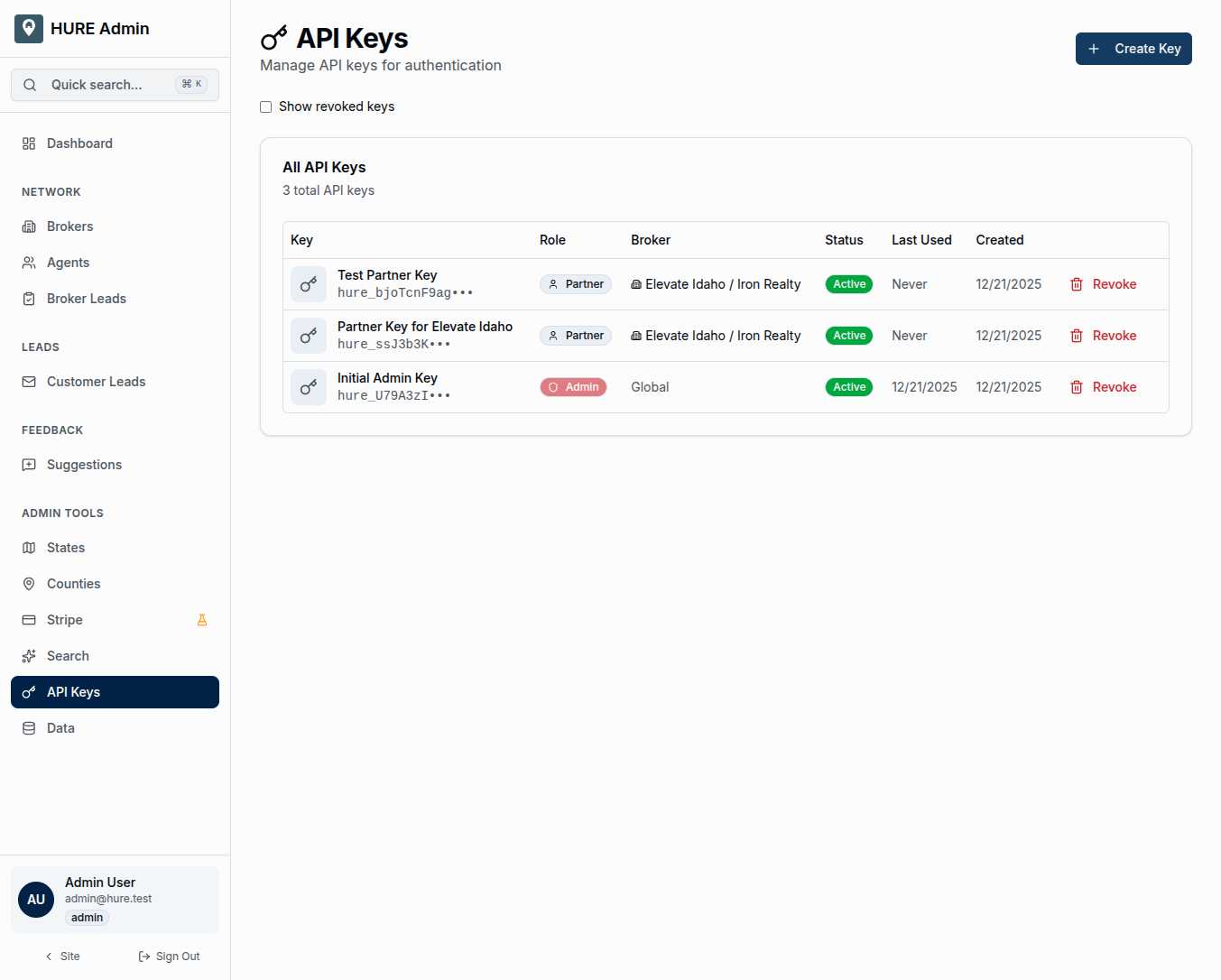
The API Keys page gives you secure, controlled access tokens that programs can use to interact with the platform. Every key is scoped, every usage is tracked, and revocation is one click away.
What You See for Each Key
The key table shows everything you need to manage access:
Key Name and Preview — A friendly identifier you chose (“Production CRM Sync”) plus a masked preview of the key itself (hure_xxx•••). You can identify keys by name; the preview confirms which key string you’re looking at.
Role — The permission level this key grants:
- Admin — Full access to all API endpoints, all data
- Partner — Limited to a specific broker’s data only
Broker Association — For Partner keys, which brokerage this key is scoped to. Admin keys show “Global” since they aren’t broker-specific.
Status — Active or Revoked. Revoked keys no longer work but remain visible for audit purposes.
Last Used — When this key last made an API call. Helps identify keys that are actively used versus forgotten.
Created Date — When the key was generated. Older keys might warrant rotation for security hygiene.
Creating a New Key
The “Create Key” button opens a simple form:
Name — Something descriptive. “Elevate Idaho CRM” beats “Key 1.” Future you will thank present you.
Role — Admin for internal automation, Partner for broker integrations.
Broker — If Partner role, which brokerage this key serves.
After creation, the full key appears exactly once. Copy it immediately. Store it securely. If you lose it, you’ll need to create a new one—we don’t store recoverable versions.
Admin Keys: The Master Access
Admin keys have no restrictions:
- Access all endpoints
- Read and write any data
- No broker scoping
- Full platform capability
Use these sparingly and protect them carefully. An admin key in the wrong hands is a serious security incident. Best practices:
- Limit who knows admin keys exist
- Rotate them periodically
- Use environment variables, never commit to code
- Monitor usage for anomalies
Partner Keys: Scoped and Safe
Partner keys are restricted by design:
- Only access the associated broker’s data
- Can read their own leads, agents, profile
- Can write updates within their scope
- Cannot see other brokers’ information
This makes Partner keys safe to share with brokers for their own integrations. Their CRM can pull their leads, but it can’t access the neighbor’s customer list.
The Revocation Backstop
Keys can be revoked instantly. One click, confirmation dialog, done. The key stops working immediately—any integration using it will start getting authentication errors.
Revocation is appropriate when:
- A key might be compromised
- An employee who knew the key leaves
- An integration is retired
- You’re rotating keys for security hygiene
Revoked keys can’t be reactivated. If you revoked accidentally, create a new key and update the integration.
Usage Tracking
The “Last Used” timestamp updates every time a key makes an API call. This serves several purposes:
Identifying Active Keys — A key that hasn’t been used in six months might be safe to revoke. A key used yesterday is definitely in active service.
Security Monitoring — Unexpected usage patterns (key used at 3 AM when your team works 9-5) might indicate compromise.
Audit Support — If there’s ever a question about who accessed what when, usage timestamps provide evidence.
Show Revoked Keys
A toggle reveals previously revoked keys. You usually don’t need to see them, but for audit purposes, they’re available. Revoked keys show their full history—when created, when revoked, by whom.
Integration Patterns
Broker CRM Sync Partner key → Broker’s CRM system → Pulls leads, pushes status updates → Their customer data stays in sync with HURE.
Automated Reporting Admin key → Scheduled script → Exports statistics → Generates daily/weekly reports automatically.
Webhook Integrations Partner key → Third-party system → Receives real-time lead notifications → Instant alerts on new inquiries.
Development and Testing Admin key (test environment) → Developer machines → Testing new integrations safely.
Key Security Best Practices
Treat keys like passwords. Don’t email them, don’t Slack them, don’t put them in documents. Use secure secret management.
Scope minimally. If an integration only needs Partner access, don’t give it Admin. Limit blast radius.
Rotate periodically. Even if nothing is wrong, rotating keys limits exposure time.
Monitor and review. Audit who has keys, check usage patterns, revoke unused keys.
Document ownership. Know which person or system owns each key. When they leave or get decommissioned, you’ll know what to revoke.
The Gate That Matters
API keys are the difference between “anyone can access” and “only authorized systems can access.” They’re small strings of text with enormous power.
This page gives you control over those strings—creating them carefully, scoping them appropriately, tracking their use, and revoking them when necessary.
Guard them well.