The Gateway to Your Network
Every brokerage partnership starts as an application. A real estate professional somewhere in America saw the Hometown USA opportunity, filled out a form, and submitted their request to join. Now their application sits in this queue, waiting for your review.
The Broker Lead Assignments page is where you evaluate potential partners, verify their credentials, and make decisions that shape the network. Each approval adds a new partner committed to serving military families. Each rejection keeps your standards intact.
Applications Awaiting Decision
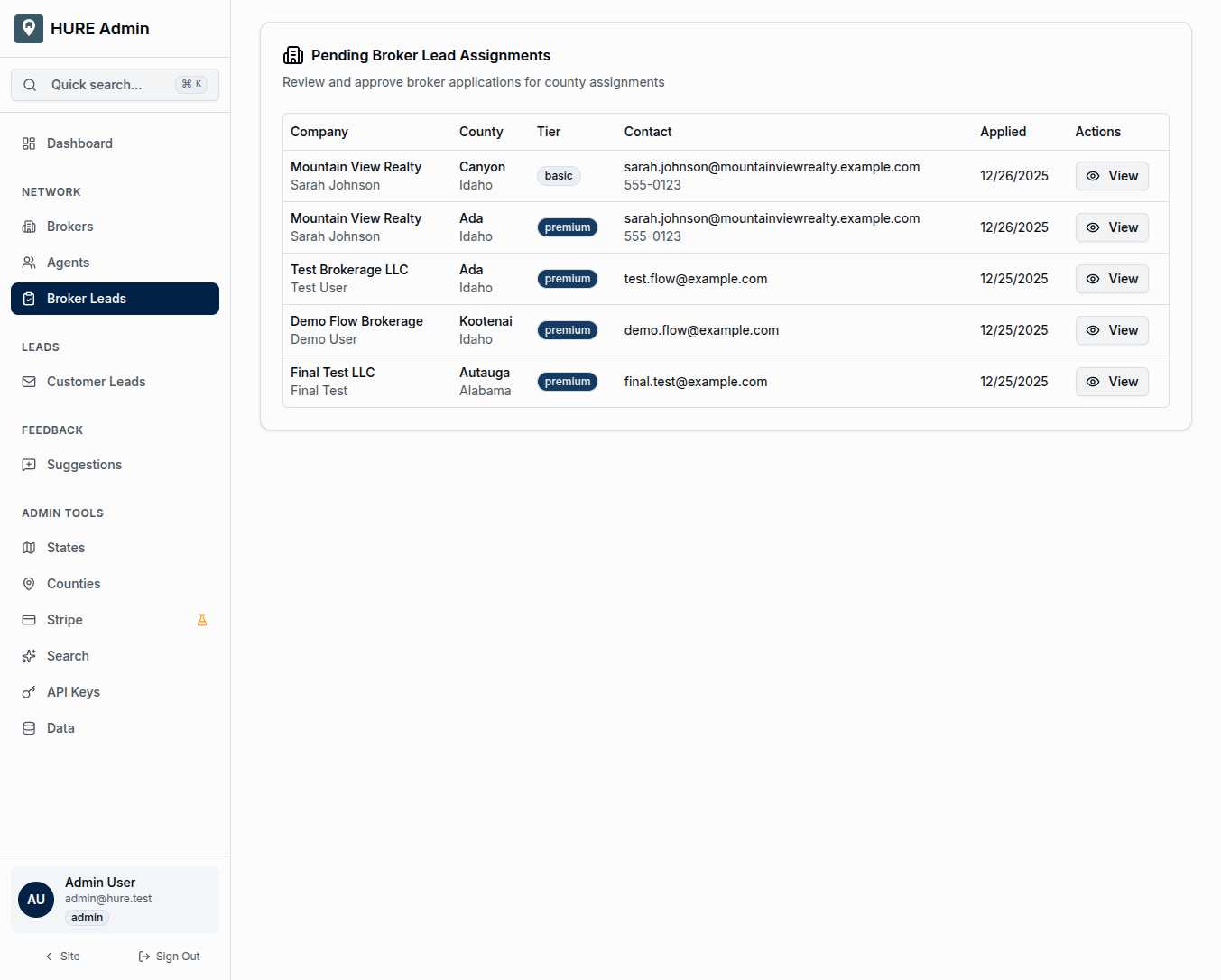
The main table shows every pending application:
Company Name and Contact — The brokerage applying and the person who submitted. This tells you who you’re dealing with—an established firm? A new agency? An individual broker starting their own shop?
Requested County — The territory they want to claim. Remember the exclusivity model: approving this application means no other broker can serve that county. Make sure this partner is the right fit for that community.
Tier — The subscription level they’ve selected. Basic coverage or premium visibility? This affects pricing and features, but shouldn’t affect your approval decision—quality matters more than tier.
Contact Information — Email and phone for direct outreach when you have questions.
Applied Date — When they submitted. Applications shouldn’t languish. A professional response time reflects well on the network.
Tier Badges
Visual indicators help you quickly assess:
Basic — Standard county coverage with core features Premium — Enhanced visibility, priority lead routing, additional features
Both tiers receive the same quality of service from the network—the difference is in marketing visibility and optional add-ons.
The Review Process
Click “View” to dig into any application:
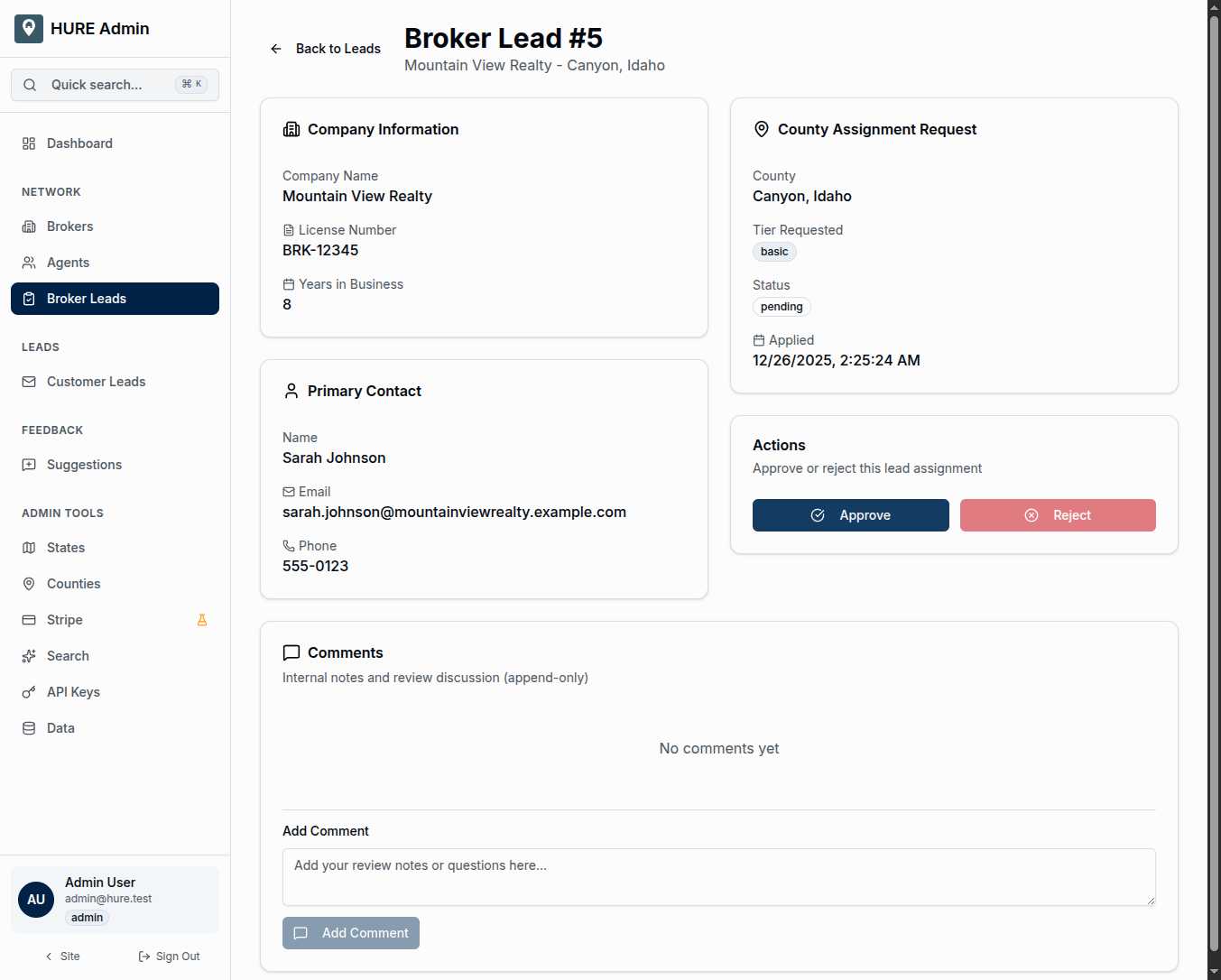
Complete Application Details — Everything they submitted: company information, contact details, business documentation, county selection, tier choice.
County Context — Is this county currently available? Does it make geographic sense for this broker? Are there nearby partners who might provide insight?
Internal Comments — Your team’s notes about this application. Append-only for audit purposes—once written, comments become permanent record. Use them to document your reasoning, flag concerns, or record verification calls.
Approve or Reject — Two buttons, one decision. Approve sends the applicant to payment and account creation. Reject ends the application with an optional explanation.
What Approval Triggers
When you click approve, a sequence begins:
- Application Status Updates — Marked as approved in the system
- Payment Required — If the tier requires payment, Stripe checkout initiates
- Account Creation — After payment (or immediately for free tiers), Keycloak creates their user account
- Portal Access — The new broker can log in and access their dashboard
- County Assignment — Their requested county becomes their exclusive territory
The entire flow from approval to active partner happens automatically. Your decision is the starting gun.
What Rejection Means
Rejection isn’t failure—it’s quality control. Maybe the county already has pending applications from stronger candidates. Maybe the broker’s documentation raises concerns. Maybe their geographic focus doesn’t align with network needs.
Rejected applications can include feedback. A brief explanation helps applicants understand the decision and potentially reapply with stronger credentials.
Rejections are logged permanently. If the same broker applies again, you’ll see their history.
The Comment Trail
Internal comments serve multiple purposes:
Documentation — Why did you approve this one? Why did you reject that one? Six months later, you’ll want the context.
Collaboration — If multiple admins review applications, comments let you share observations without meetings.
Compliance — If there’s ever a question about a decision, the append-only comment trail provides evidence.
Write comments as if a lawyer might read them someday. Professional, factual, documented.
Building the Right Network
Not every applicant should become a partner. The exclusivity model means each county gets exactly one broker—choose wrong, and that community is stuck with subpar service until the relationship ends.
Look for:
- Local Knowledge — Do they actually know the county they’re requesting?
- Military Experience — Have they served military families before?
- Professional Standing — Are they in good standing with their license and associations?
- Realistic Expectations — Do they understand the commitment they’re making?
The best network isn’t the biggest network. It’s the one where every partner genuinely serves families well. This page is where you ensure that quality.