Families Reaching Out for Help
Every lead represents a family in transition. Someone facing PCS orders, uncertain about their destination, hoping to find a community that feels like home. They filled out a form, submitted their information, and trusted the platform to connect them with someone who can help.
The Customer Leads page is where those hopes become actions. Each inquiry sits waiting for attention—information captured, destination noted, timeline recorded. Your job is to move them from “new” to “helped.”
The Journey of Every Lead
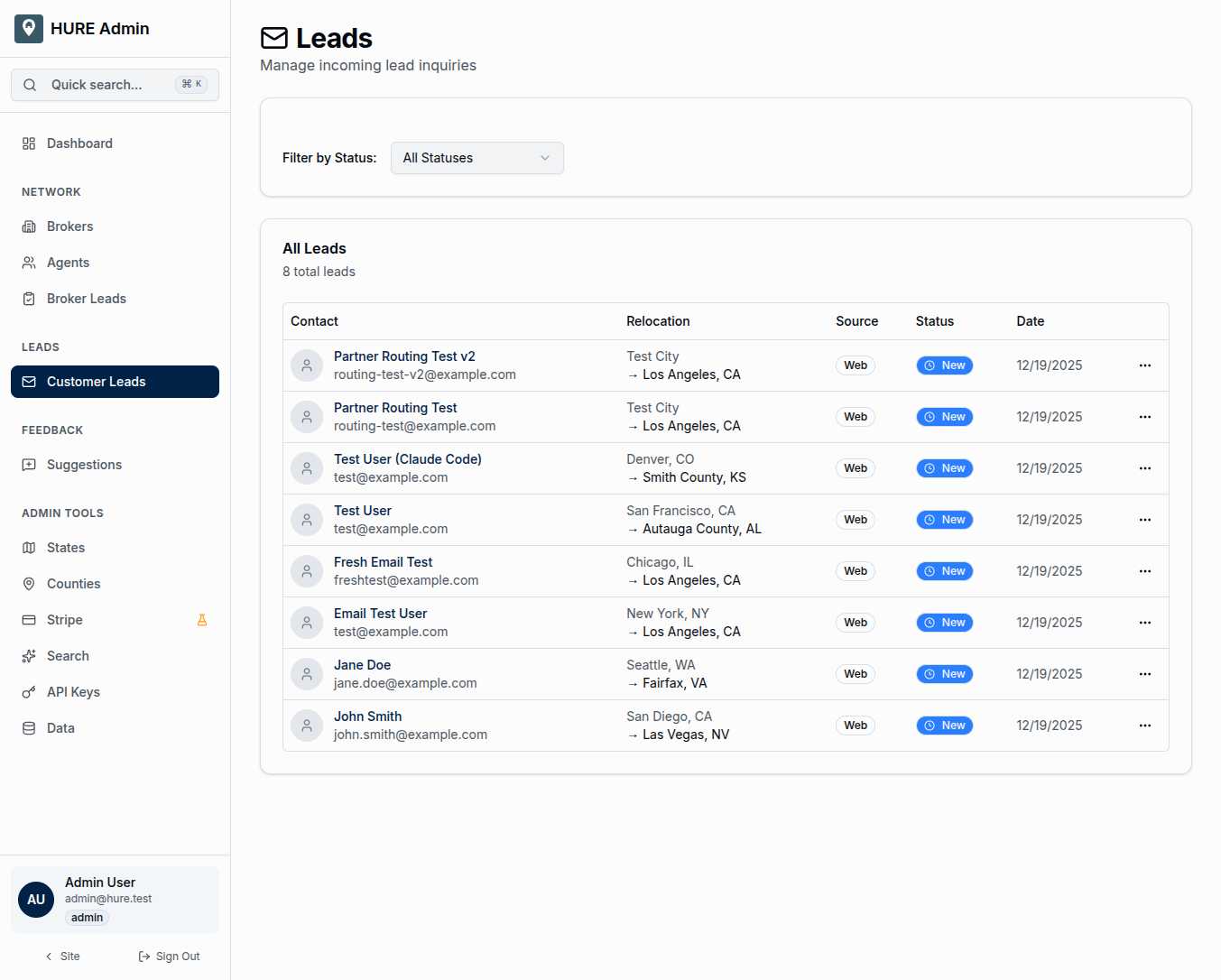
When a family submits an inquiry, their lead appears in this queue with everything you need to know:
Contact Information — Name and email, the basics of reaching out. An avatar placeholder keeps the list scannable.
Relocation Path — Where they’re coming from and where they’re going. “Austin, TX → Ada County, ID” tells the story at a glance. This origin-to-destination view helps you understand each family’s journey.
Source — How did they find us? Web form submission, referral from a friend, broker recommendation, or phone inquiry. Understanding sources helps you track what’s working.
Status — A color-coded badge showing where this lead stands in the process.
Date — When the inquiry arrived. Fresh leads demand attention; older ones might need follow-up.
Status Tells the Story
Leads progress through a natural workflow:
New — Just arrived, nobody has touched it yet. These are your priority. A family is waiting.
Contacted — Someone reached out. First contact made, conversation started.
Qualified — This is a real relocation prospect. They’re serious about moving, timeline makes sense, budget is realistic.
Assigned — Handed off to a specific broker or agent. The right person is now responsible for this family’s success.
Closed — Story complete. Either they found their new home, or the lead didn’t work out. Either way, the journey has concluded.
The filter dropdown lets you focus on what matters. Show only new leads when you’re doing morning triage. Show only assigned leads when checking partner performance.
Inside Each Lead
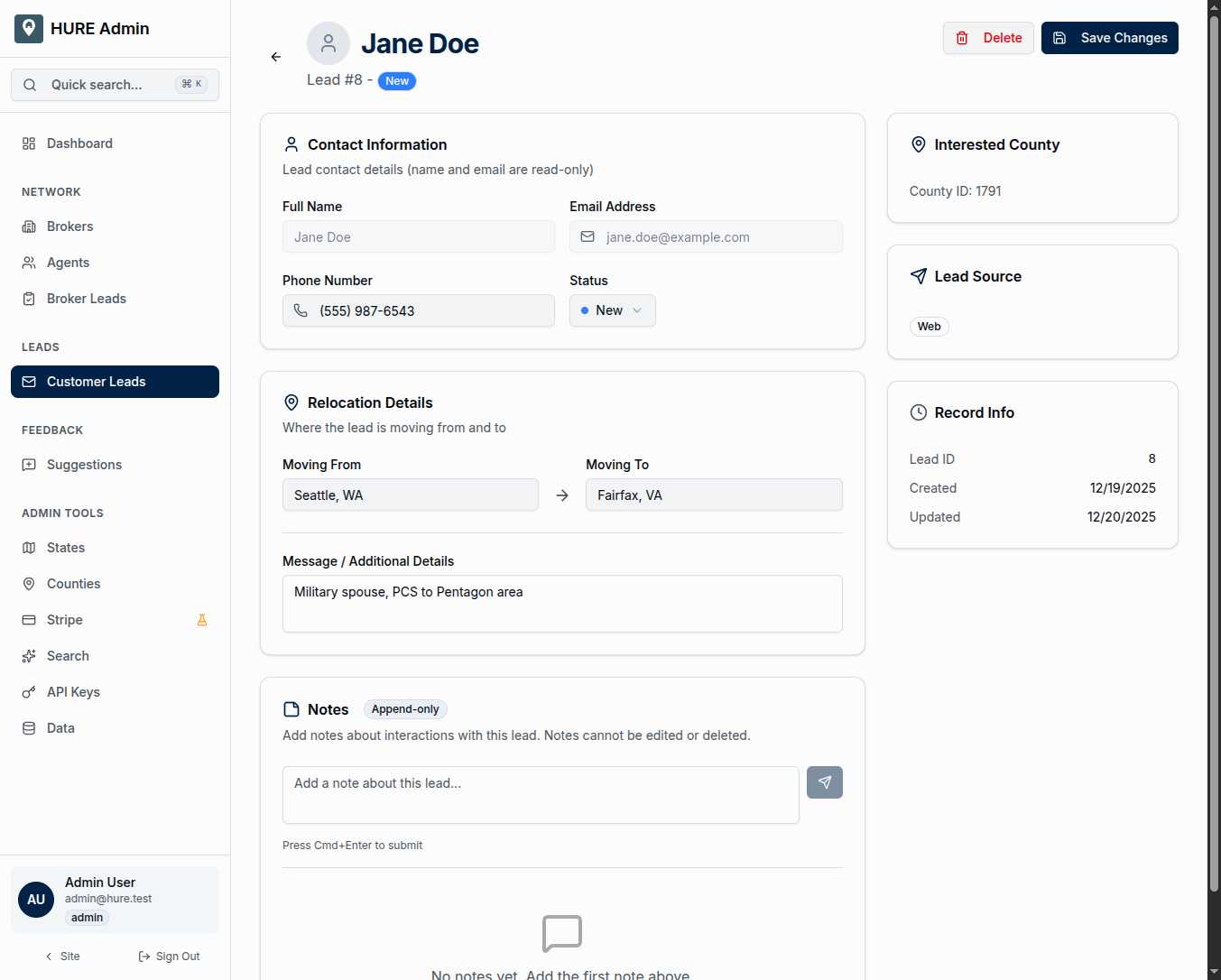
Click into any lead to see the full picture:
Contact Details display the family’s name, email, and phone. Some fields are read-only—we don’t change what the customer told us—but phone numbers can be updated as you gather more information.
Relocation Details show the complete journey: where they’re moving from, which county they’re researching, and the original message they submitted. Their words, preserved exactly as written.
Status Controls let you advance the lead through the workflow with a single dropdown change. New to contacted. Contacted to qualified. Each transition happens immediately.
The Notes That Never Change
The append-only notes system deserves special attention. Here’s why it matters:
Every interaction with a lead gets documented. You called on Tuesday—add a note. They mentioned a concern about school districts—add a note. The broker reported back about the showing—add a note.
But here’s the critical part: notes cannot be edited or deleted after creation. Once you write something down, it’s permanent. Every note captures who wrote it, what they said, and exactly when they said it.
This isn’t a limitation—it’s a feature. When there’s ever a question about what happened with a lead, the notes provide an unalterable audit trail. No “he said, she said.” Just documented facts, timestamped and attributed.
For military families especially, this accountability matters. Their relocation support should be documented, trackable, and above reproach.
Routing to the Right Partner
The platform matches leads to brokers automatically based on destination county. Family researching Ada County, Idaho? They get connected to the broker covering that territory.
But routing isn’t always automatic. Sometimes you need to manually assign a lead—special circumstances, broker preferences, or complex multi-county moves. The assignment system gives you that control while maintaining the exclusivity model.
The Human Behind the Data
Every row in this table is a family’s story in progress. Orders received, maybe unexpected. Questions about a place they’ve never been. Uncertainty about what comes next.
The Customer Leads page transforms that uncertainty into connection. You see the inquiry. You route it to the right partner. You track the progress. You document the interactions.
And hopefully, a few weeks or months later, another family finds their hometown.