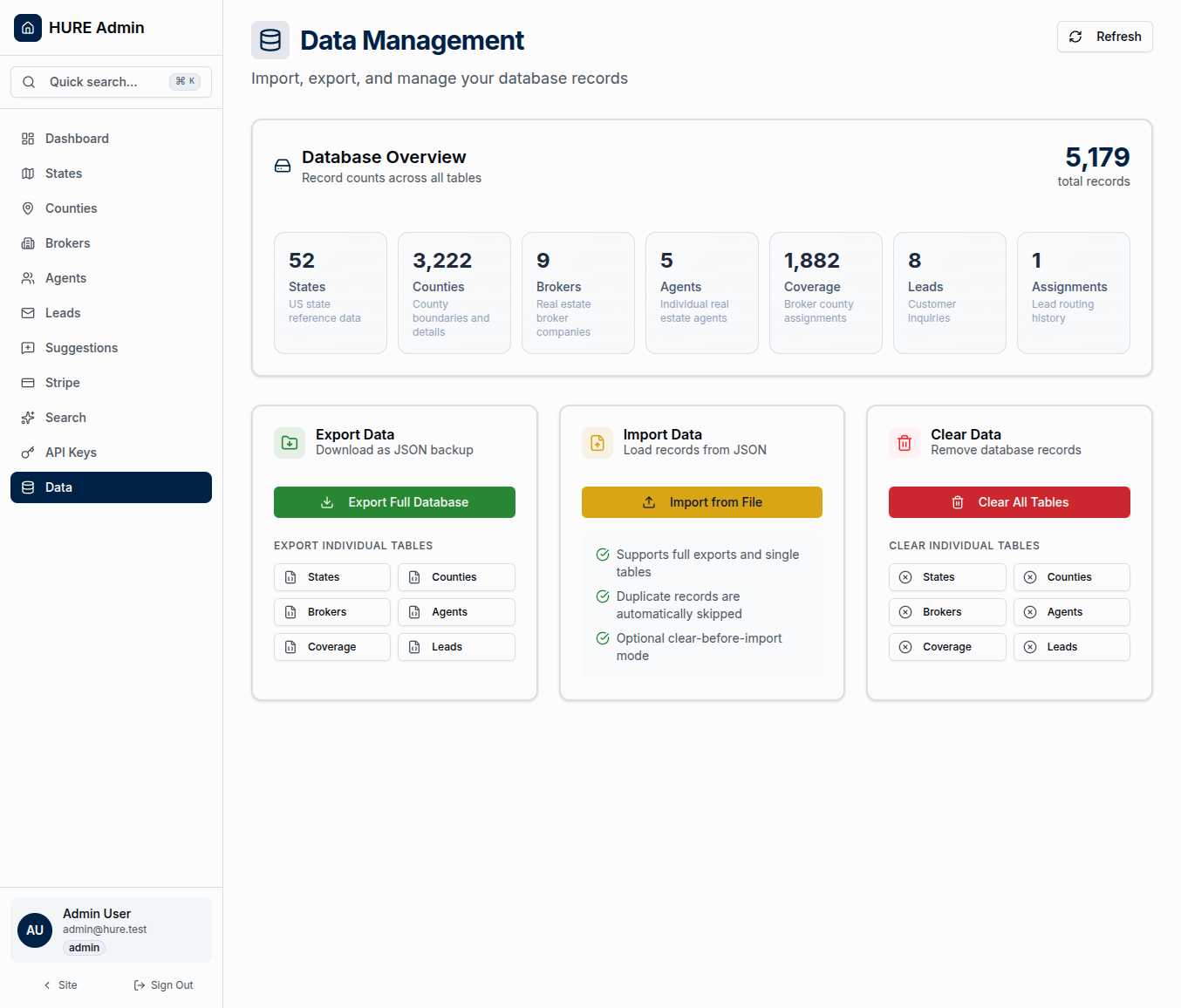
Your Data, Completely Under Your Control
Data is the foundation of everything—county boundaries, broker partnerships, customer inquiries, geographic coordinates. If the database disappeared tomorrow, the platform would be an empty shell. That’s why the Data Management page exists: complete import and export capabilities that put you in control of every record.
One-click exports capture the entire database. Smart imports populate new environments. Table-by-table operations let you work surgically when needed. This is enterprise-grade data management without the enterprise complexity.
The Database at a Glance
Real-time statistics show exactly what you’re managing:
5,179+ Total Records — The sum of everything in the production database. This number grows as brokers join, leads arrive, and coverage expands.
The breakdown tells the story:
- 52 States — All US states and territories
- 3,222 Counties — Complete geographic coverage
- 9+ Brokers — Active partnerships in the network
- 5+ Agents — Real estate professionals serving families
- 1,882 Coverage Records — Broker-to-county assignments
- 8+ Leads — Customer relocation inquiries
- Assignments — Lead routing history
Refresh the statistics anytime to see current counts. When you’ve just imported data or cleared a table, the updated numbers confirm what happened.
Export: Capture Everything
The export functionality gives you multiple options:
Full Database Export captures every record across all tables in a single JSON file. Click once, and you download hure-full-export-YYYY-MM-DD.json containing the complete platform state. Metadata included: schema version, export timestamp, record counts.
This is your disaster recovery snapshot. If something goes catastrophically wrong, this file is how you rebuild.
Individual Table Export lets you work more selectively. Need just the county data? Export only counties. Want to share broker information with an external system? Export only brokers. Each table downloads as its own focused JSON file.
Use cases for selective export:
- Creating test datasets for development
- Sharing geographic data with partners
- Auditing specific table changes over time
- Building reports from structured data
Import: Smart and Safe
Importing data requires care—you don’t want to corrupt production with bad data. The import system has safeguards built in:
Schema Validation — Before any data touches the database, the system checks that your import file matches the expected format. Wrong schema version? Missing required fields? You’ll know before anything changes.
Duplicate Detection — Records that already exist get skipped automatically. Import the same file twice, and the second import simply reports “0 new records, N skipped.” No duplicates, no errors.
Foreign Key Awareness — The system imports tables in dependency order. States before counties. Brokers before agents. Counties before coverage. You don’t need to think about relationships—they’re handled automatically.
All-or-Nothing Transactions — If something fails mid-import, everything rolls back. You never end up with a half-imported database.
The import workflow is simple:
- Click “Import from File”
- Select your JSON export (full database or single table)
- Optionally check “Clear Before Import” for a fresh start
- Watch the progress as records process
- See the summary: imported, skipped, errors
Clear Data: The Nuclear Option
Sometimes you need to start fresh. Test data cluttering production. Migrating to a new environment. Development cleanup.
Full Database Clear removes everything—all records from all tables. This is destructive and irreversible. Multiple confirmation prompts ensure you really mean it.
Individual Table Clear works more surgically. Clear just the leads without touching counties. Remove old coverage records without affecting brokers. When you know exactly what needs to go, target just that table.
Safety features prevent accidents:
- Confirmation dialogs that require explicit acknowledgment
- Admin-only access (regular users can’t reach this page)
- Audit logging of clear operations
- Foreign key ordering (dependents cleared before parents)
Real-World Scenarios
Initial Production Setup The Data Management page powered the original production deployment. Export from development → Import to production → Verify all 5,179 records transferred correctly. The map loaded 3,222 counties on the first try.
Daily Backups A scheduled export to secure storage creates nightly snapshots. Thirty days of rolling history ensures you can recover from any point.
Staging Refresh Export production data → Clear staging database → Import to staging → Test new features against real data → Clear staging when done.
Partner Data Sharing Export county and state data → Share with integration partner → They build their own system using your geographic foundation.
Respect the Power
This page provides capabilities that can build or destroy your entire platform. Export captures everything worth protecting. Import populates fresh environments. Clear removes what’s there.
Use exports regularly—daily if possible. Test your imports before you need them in an emergency. And treat clear operations with the gravity they deserve.
Your data is your platform. This page is how you protect it.