Find Anything, Instantly
Managing 3,222 counties, dozens of brokers, and hundreds of agents means you’re constantly looking for specific records. The Quick Search gives you access to everything in the platform through a single search interface—no navigating to specific sections, no scrolling through lists.
Press ⌘+K (or Ctrl+K on Windows), type what you’re looking for, and you’re there.
Keyboard-First Design
Power users live by keyboard shortcuts. Quick Search was built for you:
⌘+K / Ctrl+K opens the search modal from anywhere in the admin panel. You don’t need to reach for the mouse.
Arrow Keys navigate through results. Up and down to move between matches, then Enter to select.
ESC dismisses the modal when you’re done. Clean, quick, out of your way.
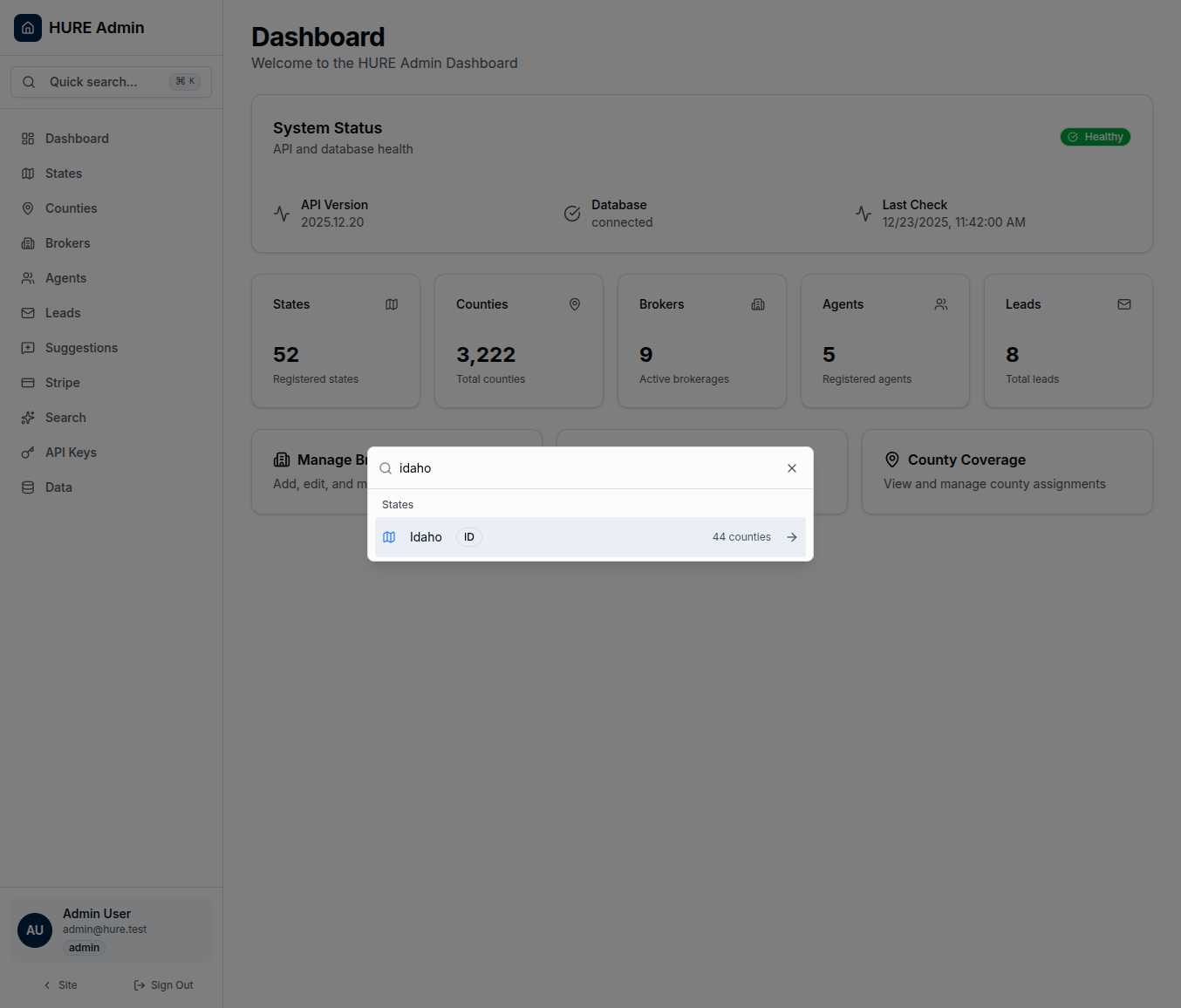
The search input is auto-focused the moment the modal opens. Start typing immediately—no clicking required.
Smart Results, Organized
Type a few characters and results appear instantly, grouped by type:
States appear with their two-letter abbreviation and county count. Search “Idaho” and you’ll see “Idaho (ID) - 44 counties” with everything you need to know at a glance.
Counties show their name and state. Looking for a specific county? Type part of the name and it surfaces immediately.
Brokers display with their company name and key details. Need to find a partner quickly? Search their name.
Agents appear with their brokerage association. Find individuals within the network without navigating through their broker first.
Each result category is clearly labeled, so you can scan results and find what you need even when multiple entity types match your search.
Intelligent Matching
You don’t have to type exact matches. The search is forgiving:
Partial matches work. Type “Idah” and Idaho appears.
Fuzzy matching catches typos. Mistype a county name and you’ll probably still find it.
Multi-entity results let you search across the entire platform with one query. Type “Twin Falls” and see both the county and any brokers or agents associated with that area.
The search indexes update automatically as data changes. New broker? They’re searchable immediately.
One Click to Anywhere
Click a result and you’re taken directly to that record’s detail page. No intermediate screens, no additional navigation.
Find a broker → click → you’re on their edit page.
Find a county → click → you’re managing that county’s information.
The search isn’t just a lookup tool—it’s a navigation accelerator.
Always Available
The Quick Search button sits in the navigation bar, but keyboard shortcuts mean you never need to click it. Whether you’re reviewing leads, editing broker profiles, or managing county content, ⌘+K brings up search without leaving your current context.
The modal appears as an overlay, keeping your current page visible in the background. When you dismiss search, you’re exactly where you left off.
Built for Speed
Search results appear after just two characters. Debouncing prevents excessive API calls while you’re still typing, but the moment you pause, results are there.
The entire experience is designed around a simple principle: get you to what you need as fast as possible. No loading spinners, no waiting, no frustration.
You think of what you need. You type a few letters. You’re there.
Administration Without Friction
The difference between a frustrating admin panel and a pleasant one often comes down to small details. Quick Search is one of those details—a feature that respects your time and gets out of your way.
Three thousand counties. Dozens of partners. Hundreds of agents. One search box that finds them all.
⌘+K. Type. Enter. Done.