The Building Blocks of Geography
Before there are counties, there are states. Fifty states plus DC and Puerto Rico form the foundation of every search, every filter, every geographic feature on the platform. When a family says “I’m thinking about moving to Florida,” the state record is where their journey begins.
The States Management page gives you complete control over how each state is represented—not just its name and abbreviation, but the rich semantic data that powers intelligent search matching.
Understanding the Scale
Three numbers set the context:
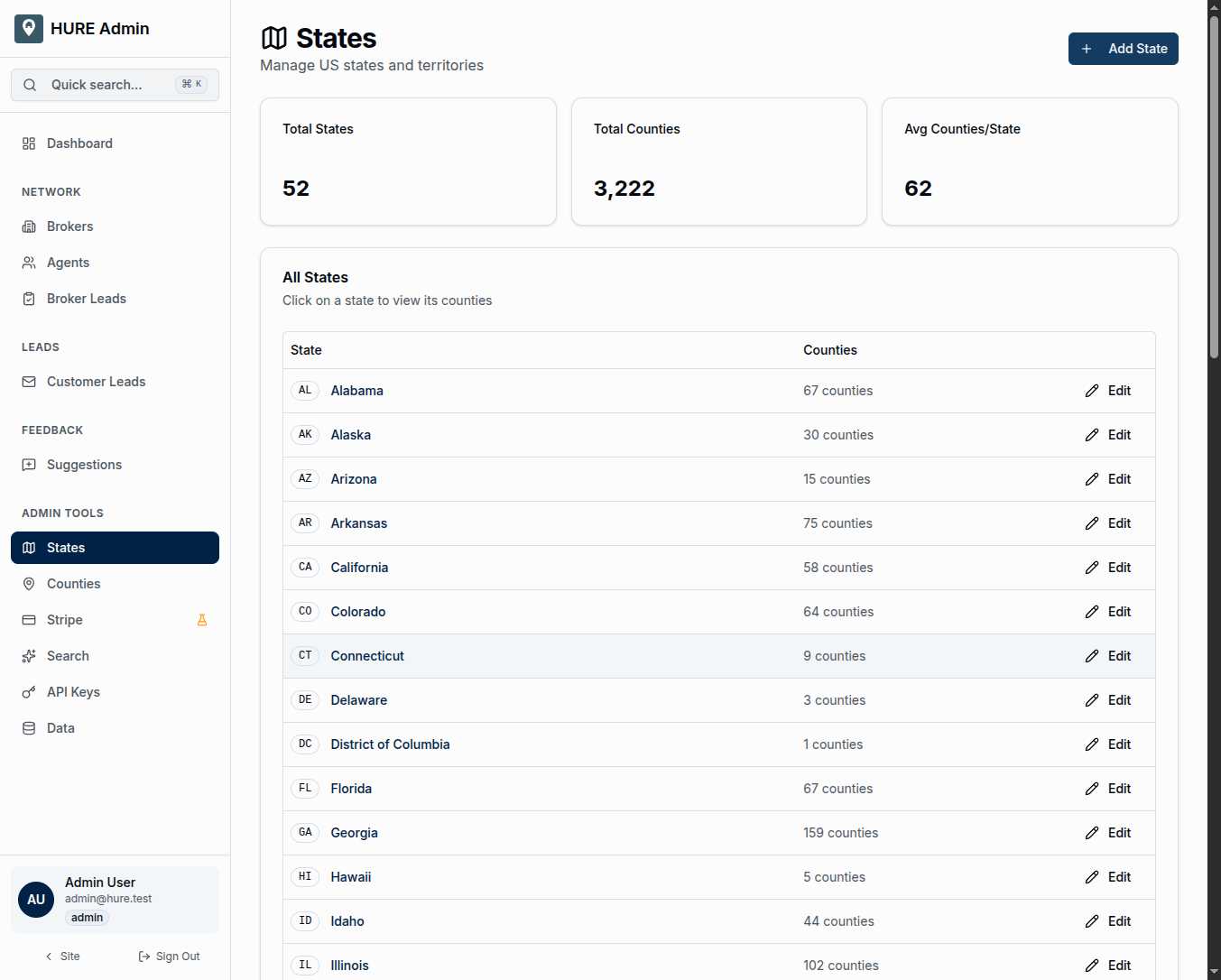
52 States and Territories — Every state, plus Washington DC and Puerto Rico. Complete coverage of where military families might find themselves stationed.
3,222 Counties — The total counties across all states. Texas has 254. Delaware has 3. Each state contributes its piece to the national puzzle.
62 Average Counties per State — A quick reference for thinking about state-level scale. Some states have many more, some have fewer.
What You See in the List
The state table keeps things simple:
Abbreviation Badge — The two-letter postal code that identifies each state. FL, TX, CA, ID. These codes appear throughout the platform for quick recognition.
State Name — The full name, clickable to view that state’s counties.
County Count — How many counties belong to each state. Useful for understanding the scope when you’re planning content creation or reviewing coverage.
Edit Action — Direct access to the state’s full profile.
The Semantic Search Engine
Here’s where states become powerful. Each state profile contains fields specifically designed to power natural language search:
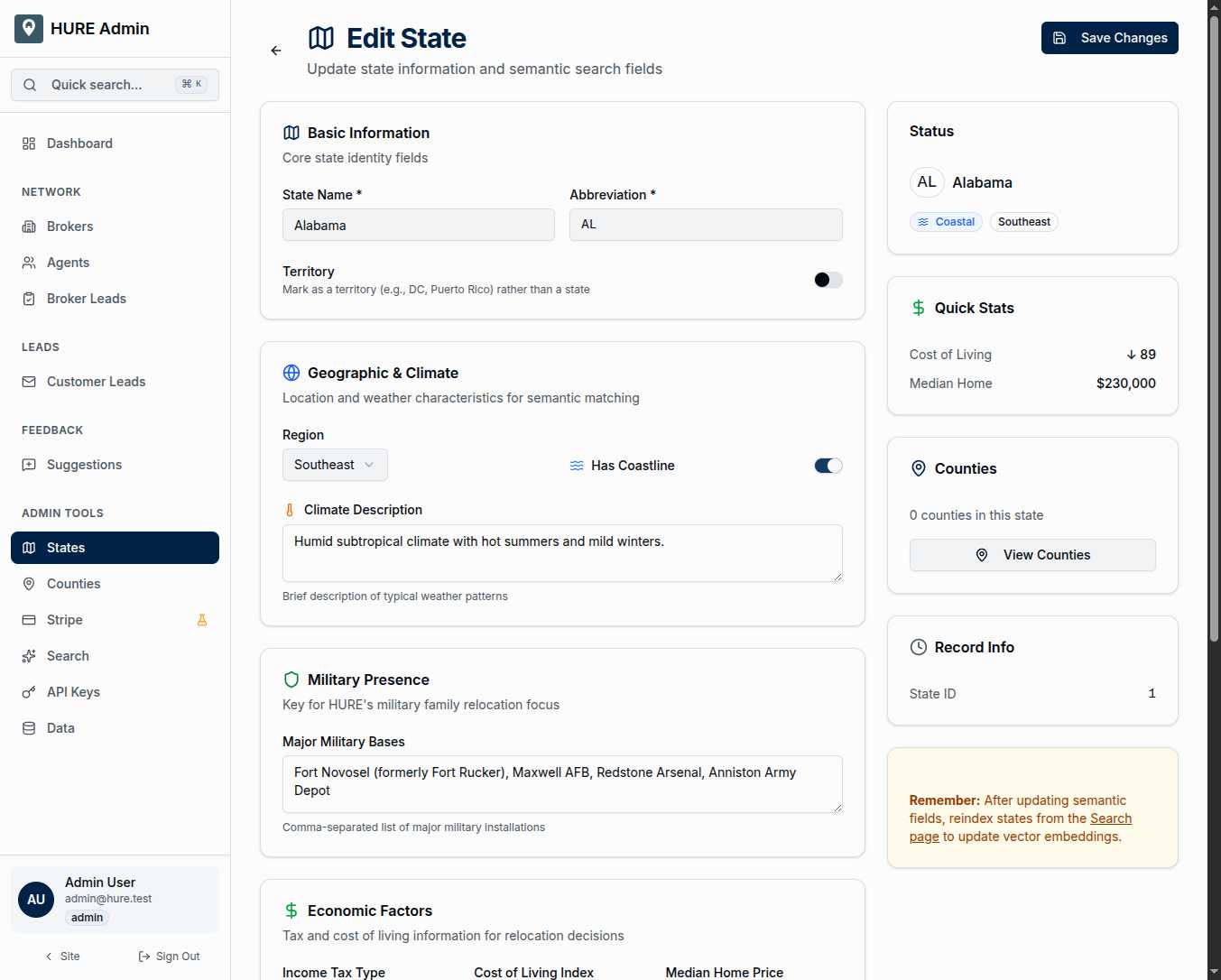
Region — Geographic classification: Northeast, Southeast, Midwest, Southwest, West, or Pacific. When a family searches for “a Midwest state with low costs,” this field helps narrow results.
Has Coastline — A simple yes or no. When someone wants “a coastal state,” you need to know which states qualify.
Climate Description — Weather patterns, seasons, what to expect year-round. “Mild winters, hot humid summers” versus “Four distinct seasons with snowy winters” versus “Year-round sunshine.” Families care deeply about climate.
Major Military Bases — This is critical for HURE’s mission. A comma-separated list of installations: Fort Hood, Fort Bragg, Naval Station Norfolk. When a family receives PCS orders, they often search by their destination base. This field makes that search work.
Income Tax Type — None, flat rate, or progressive brackets. Tax-conscious families ask about this frequently. Texas and Florida’s zero income tax is a major draw.
Cost of Living Index — Relative to the national average (100). A score of 85 means 15% cheaper than average. A score of 120 means 20% more expensive. This powers affordability searches.
Median Home Price — Current market values. Families set budgets and want states that fit them.
Description — A rich paragraph about the state. This text gets converted to vector embeddings for semantic search. Write it like you’re telling someone why they might love living there.
Highlights — Key selling points and search-relevant terms. “No state income tax,” “Military-friendly,” “Excellent public schools,” “Outdoor recreation paradise.”
How Semantic Search Uses This Data
When a family searches “warm coastal state with military bases and no income tax,” here’s what happens:
- The query gets converted to a meaning vector
- State descriptions and highlights get compared by semantic similarity
- Florida surfaces high (coastal, warm, military bases, no income tax)
- Texas surfaces high (warm, military bases, no income tax—though not technically coastal everywhere)
- Results appear ranked by relevance
The magic is in the matching. The family didn’t have to know to search for “Florida.” They described what they wanted, and the semantic fields made the connection.
Keeping Search Fresh
When you update a state’s semantic fields—description, highlights, economic data—those changes don’t immediately appear in search results. The vector embeddings need rebuilding.
The sidebar on each state edit page reminds you: “Reindex states after updating semantic fields.” The Search admin page has the button to trigger that reindexing. It runs in the background and usually completes in under a minute.
Make your updates. Reindex. Search works with the new data.
States as Search Accelerators
In a platform about counties, why do states matter so much?
Because families often start their search at the state level. “Should we move to Texas or stay in North Carolina?” They’re comparing states before they’re comparing counties. Your state-level semantic data powers that early exploration.
Once they’ve narrowed to a state, the search drills down to counties. But the state descriptions help them get there.
Adding Territories
The “Add State” button lets you add new territories if needed. The database started with 50 states plus DC and Puerto Rico—but if the platform expands to cover Guam or the US Virgin Islands, the infrastructure supports it.
New states require the same semantic field population as existing ones. A state without rich descriptions is invisible to semantic search.
The Foundation Beneath Everything
Counties get the glamour—they’re where families actually live. But states provide the structure. Regional classification. Tax policy. Climate patterns. Military base presence.
This page ensures that foundation is solid. When a family describes their dream state in plain English, the semantic search finds the match. That starts here.