Where Business Meets Platform
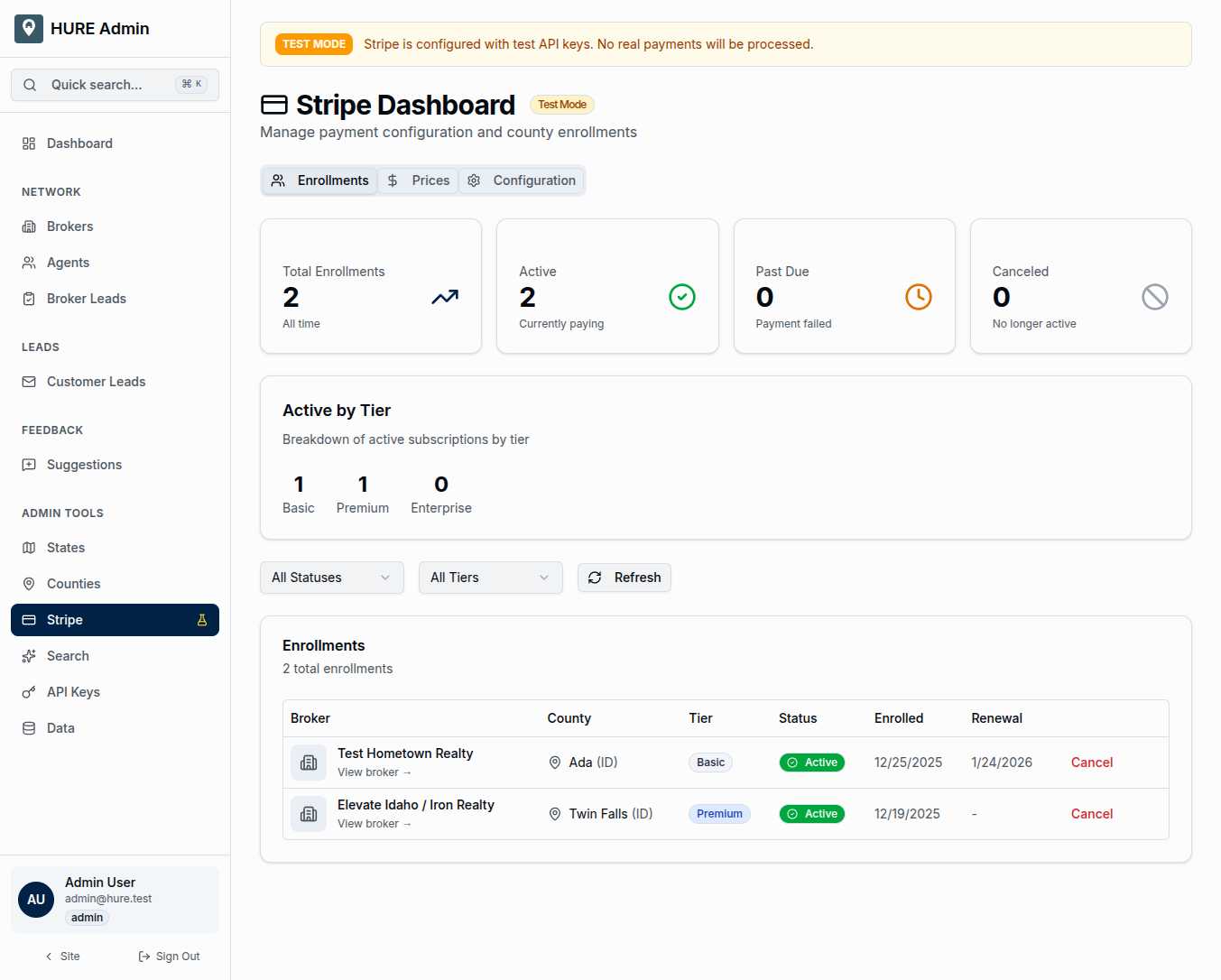
Hometown USA isn’t just a directory—it’s a subscription business. Brokers pay monthly fees for exclusive county coverage. That revenue keeps the platform running, the support staff employed, and the mission alive. The Stripe Dashboard is where you monitor the financial health of that business.
Enrollment counts. Payment statuses. Tier distribution. Grace periods. Everything related to subscription billing lives here, integrated directly with Stripe’s payment infrastructure.
The Enrollment Snapshot
Four statistics tell you immediately how the business is performing:
Total Enrollments — Every broker-county relationship with a billing component. One broker covering three counties means three enrollments.
Active — Currently paid and in good standing. These are the healthy subscriptions driving revenue.
Past Due — Payment failed, but we’re still within the grace period. These need attention but aren’t yet critical.
Canceled — Voluntarily ended subscriptions. The broker chose to leave, and their coverage ended.
These numbers update in real-time as payments succeed, fail, or get canceled.
Understanding the Tiers
Not all subscriptions are equal. The platform offers multiple pricing tiers:
Basic — Standard county coverage with core features. Most brokers start here.
Premium — Enhanced visibility in search results, priority lead routing, and additional marketing features.
Enterprise — Multi-county coverage with volume discounts and dedicated support.
The tier breakdown shows how subscriptions distribute across pricing levels. A healthy mix suggests the value proposition resonates at different price points.
The Enrollments Tab
This is your detailed view into every subscription:
Broker — Which brokerage owns this enrollment.
County — Which territory this subscription covers.
Tier — Basic, Premium, or Enterprise.
Status — Active, Past Due, Canceled, or Lapsed. Color-coded for instant assessment.
Enrolled Date — When the subscription began.
Renewal Date — When the next payment is due.
Filter by status to focus your attention. Show only past due subscriptions when you’re doing collection follow-up. Show only active subscriptions when reviewing total coverage.
The Grace Period Lifeline
Failed payments don’t immediately kill a subscription. The platform implements a 30-day grace period:
Day 0 — Payment fails. Status changes to Past Due. The broker’s coverage continues.
Days 1-30 — Broker remains visible to families. They can still receive leads. Stripe retries the payment automatically.
Day 31 — If payment still hasn’t succeeded, the enrollment lapses. Coverage ends. The county becomes available again.
This grace period protects both brokers (who might just have an expired card) and families (who don’t lose their local expert over a temporary payment glitch). But it also requires monitoring—past due enrollments need human follow-up if automated retries aren’t working.
The Prices Tab
Stripe requires price objects for each subscription tier. This tab shows:
- Currently configured price IDs
- Tier-to-price mappings
- Sync status with Stripe
When you change pricing—launching a promotion, adjusting tier costs, or adding new options—this tab ensures the platform and Stripe stay aligned.
The Configuration Tab
Backend settings for the Stripe integration:
Webhook Endpoint — The URL where Stripe sends payment events. When a payment succeeds or fails, Stripe calls this endpoint, and the platform updates enrollment status automatically.
API Key Status — Confirmation that the Stripe integration is properly authenticated.
Test Mode Toggle — Critical for development. When test mode is active, a prominent banner warns you that you’re working with test data, not real payments.
Webhook Events That Matter
The platform listens for specific Stripe events:
invoice.payment_succeeded — A payment went through. The enrollment becomes (or stays) Active. Renewal date extends.
invoice.payment_failed — Payment didn’t work. The enrollment becomes Past Due. The grace period clock starts.
customer.subscription.deleted — The subscription was canceled (by the broker, by you, or by Stripe after extended non-payment). The enrollment status changes accordingly.
These webhooks mean you rarely need to manually update enrollment statuses—they update themselves based on what happens in Stripe.
Test Mode: Your Safety Net
A prominent “TEST MODE” banner appears when the platform is configured with Stripe test keys. This visual warning prevents confusion between test and production data.
In test mode, you can:
- Create fake subscriptions
- Simulate payment failures
- Test webhook handling
- Verify enrollment status transitions
All without touching real money or real broker accounts.
The Financial Foundation
Every feature on the platform—the interactive map, the semantic search, the lead routing—depends on the business model working. Brokers pay for coverage. That revenue funds everything.
The Stripe Dashboard keeps you informed about that foundation. Healthy enrollment counts mean a healthy platform. Past due warnings mean action needed. The numbers don’t lie.
Watch them. Understand them. Act on what they tell you.