When Partners Want to Help
Brokers know their markets. They know when a county description is outdated, when a highlight is missing, when their own profile needs updating. The problem is: you can’t give everyone direct edit access to the database. That way lies chaos, conflicting changes, and content that drifts off-message.
The Suggestions page solves this elegantly. Brokers can propose changes. You can review them. Good suggestions get approved and applied. Questionable suggestions get rejected with feedback. Everyone contributes; quality stays high.
The Suggestion Queue
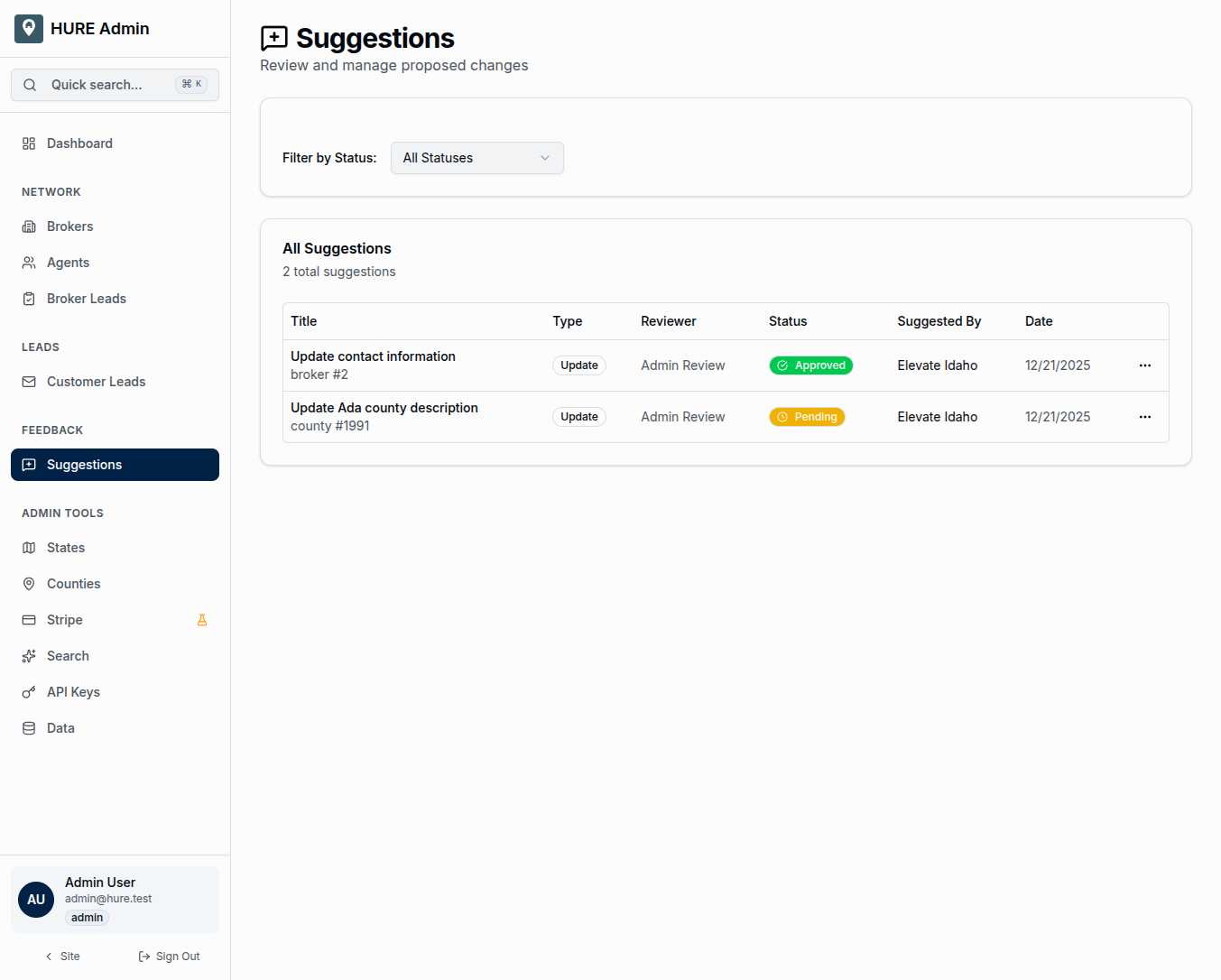
Every pending suggestion appears in a clear table:
Title — A description of what’s being proposed and what it affects. “Update Brokerage Contact Info” or “Improve Ada County Description” tells you what you’re evaluating.
Type — The kind of change:
- Update — Modifying existing data
- Create — Requesting something new be added
- Delete — Proposing removal of something
Reviewer — Who needs to approve this. Some suggestions might auto-approve (low-risk profile updates); others require admin review.
Status — Where this suggestion stands in the workflow.
Suggested By — The broker or user who submitted. Important context for evaluating the suggestion’s quality.
Date — When it was submitted. Fresh suggestions need attention; stale ones might no longer be relevant.
The Three States
Every suggestion lives in one of three states:
Pending — Waiting for review. These are your action items. A broker took time to propose an improvement; they’re waiting to see what you decide.
Approved — You accepted the change, and it’s been applied. The database now reflects what the broker suggested. The suggestion remains in history for audit purposes.
Rejected — You declined the change. The database stays as it was. Your feedback (if provided) explains why.
The status filter lets you focus on what matters. Show only pending suggestions when you’re doing a review session. Show approved suggestions when you want to see what’s recently changed.
Inside a Suggestion
Click any suggestion to see the full proposal:
The Current State — What the data looks like right now. The existing description, the current contact info, the present value.
The Proposed State — What the broker wants it to become. Their suggested new description, updated phone number, improved highlight text.
The Difference — A diff view highlighting exactly what would change. Additions in green, removals in red. You can assess the impact at a glance.
The Entity — What record this affects. Which broker, which county, which piece of content.
Reviewer Notes — Internal comments about this suggestion. Why it’s good, why it’s problematic, what follow-up is needed.
Actions — Approve or Reject buttons that execute your decision.
Why This Workflow Matters
Direct database access for partners creates problems:
- Conflicting edits when two people modify the same record
- Off-brand content that doesn’t match the platform voice
- Accidental deletions or corruptions
- No audit trail of who changed what
The suggestion system prevents all of these. Every proposed change goes through review. Nothing touches the database without approval. Every decision is documented.
This isn’t bureaucracy—it’s quality control. The platform’s content maintains consistency because someone reviews every change before it takes effect.
Types of Suggestions
Profile Updates — Brokers update their own contact information, logo, specializations. These are usually straightforward approvals—brokers know their own details best.
County Improvements — Brokers covering a county suggest better descriptions, new highlights, updated photos. They have local knowledge you lack. Review for accuracy and voice consistency.
Content Corrections — Fixing errors in existing content. A misspelled town name, an outdated statistic, a broken link. These are often quick approvals.
New Content Requests — Asking for something that doesn’t exist yet. A new highlight category, an additional field, an expanded description section. These might need more consideration.
The Collaborative Relationship
The suggestion system transforms the broker relationship. Partners aren’t passive participants waiting for you to update their profiles. They’re active contributors improving the platform with their local expertise.
You bring platform-wide consistency and editorial judgment. They bring market knowledge and ground truth. Together, you build better content than either could alone.
Keeping the Queue Manageable
A queue full of pending suggestions signals a problem—either too many submissions or not enough review time. Best practices:
- Review suggestions regularly, not in marathon sessions
- Respond quickly so brokers know their input matters
- Provide feedback on rejections so brokers learn what works
- Celebrate approved suggestions to encourage more contributions
The goal is a healthy flow: suggestions arrive, get reviewed promptly, and either improve the platform or educate the submitter.
Documentation Built In
Every suggestion, whether approved or rejected, becomes part of the permanent record. Six months from now, you can see exactly what was proposed, who proposed it, and what decision was made.
This history serves multiple purposes: auditing content changes, understanding broker engagement, identifying patterns in what people want to improve.
The Suggestions page isn’t just a workflow tool. It’s a record of the partnership between platform and brokers, documented one proposal at a time.