Your Command Center
You’ve claimed your territories. Families are discovering you through the map. Leads are starting to flow. Now you need a place to manage it all—and that’s exactly what the Broker Portal provides.
Think of it as your dashboard for everything related to your Hometown USA Real Estate presence. Your counties, your team, your leads, your status—all in one place, accessible whenever you need it.
See Everything at a Glance
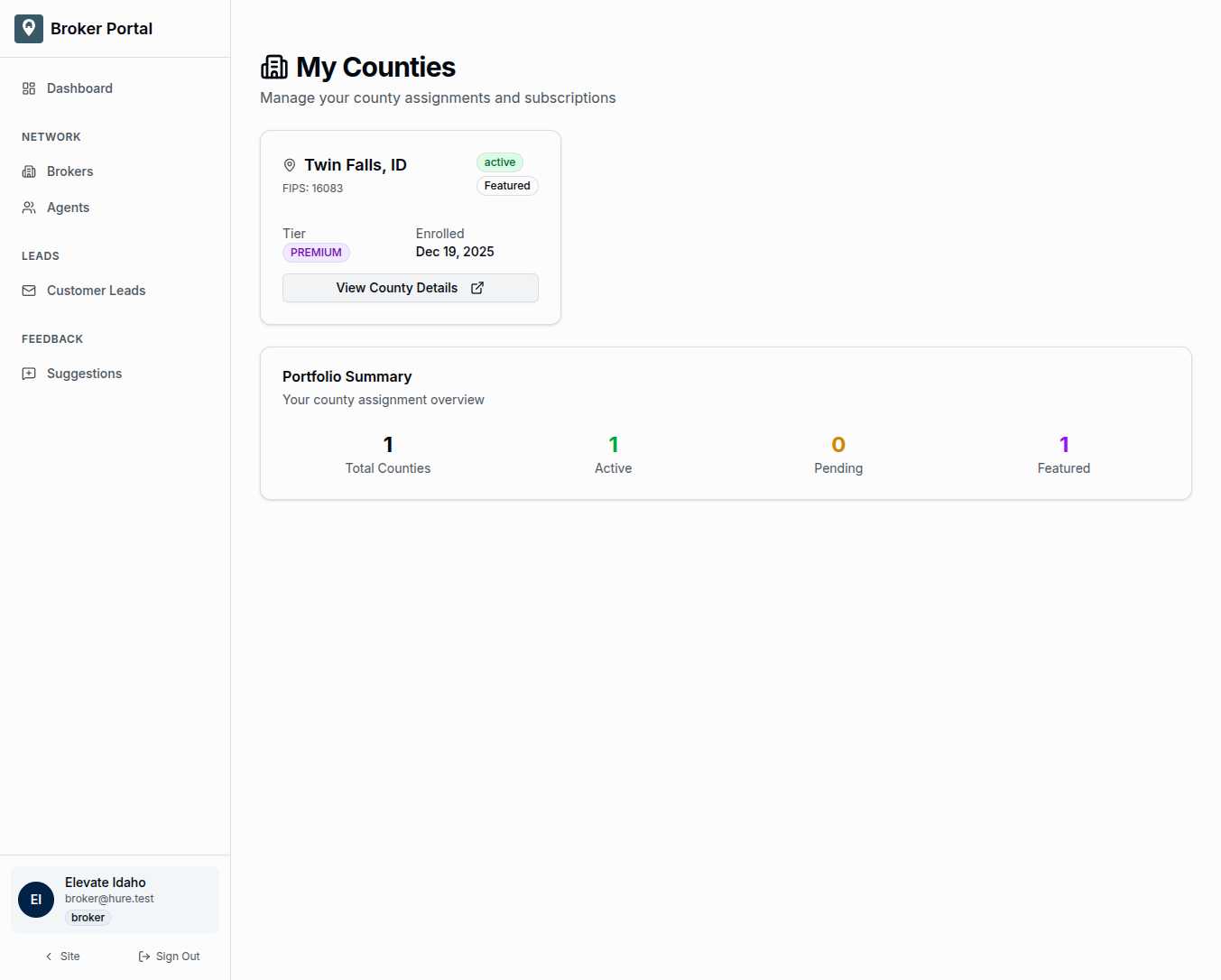
When you log into the portal, you’re greeted by your county portfolio. Every territory you’ve claimed appears as a card with the information that matters:
The county and state so you always know exactly where you’re active. Twin Falls, Idaho. Cook County, Illinois. Wherever your expertise takes you.
The FIPS code for those moments when you need the official federal identifier.
Your status shows whether each county is active, pending activation, or needs attention. Green means you’re live and visible to families. Yellow means something needs your review.
Your tier indicates your subscription level for each county—Basic, Premium, or Enterprise—so you know what features are available.
Your enrollment date reminds you when you started covering each territory, helpful for tracking the growth of your portfolio over time.
Portfolio Summary
Above your county cards, a quick summary shows the big picture:
Total Counties — how many territories you’ve claimed across the network.
Active — counties where you’re currently live and receiving leads.
Pending — counties awaiting payment processing or admin approval.
Featured — counties where you’ve opted for enhanced visibility.
One glance tells you whether everything is healthy or something needs attention.
Manage Your Presence
The sidebar navigation puts everything within reach:
Dashboard brings you back to this main view—your county portfolio and status overview.
Brokers lets you explore the network directory, seeing who else is active in nearby regions.
Agents opens your team management, where you can add agents, manage permissions, and see who’s handling what.
Customer Leads shows incoming inquiries from families who found you through the map. This is where business happens.
Suggestions lets you propose updates to your profile or county information. Want to change your brokerage description or update your contact details? Submit a suggestion and we’ll review it.
Your Profile, Always Visible
The bottom of the sidebar shows your account at a glance:
Your brokerage name, so you always know which account you’re viewing (helpful if you manage multiple businesses).
Your email, confirming the account you’re logged into.
Your role badge, showing “broker” status.
And a sign-out option when you’re done.
Understanding Status
Your counties can be in different states, and it’s important to know what each means:
Active means your subscription is current and you’re visible to families searching for help in that county. Leads come to you. This is where you want to be.
Pending means you’re waiting—either for payment to clear or for admin approval on a new territory. You’re not yet receiving leads for this county, but you will be soon.
Past Due means a payment failed, but you have a 30-day grace period. Fix the payment issue and you’ll return to active status without losing your territory.
Lapsed means the subscription expired and you’re no longer visible. Your territory becomes available for other brokerages. If this happens unintentionally, reach out to support quickly.
Subscription Tiers
Different territories may warrant different investment levels:
Basic gives you standard county listing—visible on the map, receiving leads, part of the network.
Premium adds enhanced visibility, featured placement when families search, and priority in ambiguous queries.
Enterprise is for brokerages managing multiple counties with volume-based pricing and dedicated support.
You can see your tier for each county right on the dashboard, and upgrade options are available when you want more visibility.
Built for Your Workflow
The portal isn’t just for checking status—it’s designed for daily use. When a family submits an inquiry, you’ll see it in Customer Leads. When an agent wants to join your team, you’ll manage them in Agents. When your business evolves and you want to update your profile, Suggestions lets you do that without waiting on support.
Everything flows through this single interface, keeping your Hometown USA Real Estate presence organized and manageable.
Your Business, Your Way
Some brokerages manage one county with a lean team. Others span multiple territories with agents across the state. The portal scales with you. Whether you’re checking in weekly or monitoring leads daily, you’ll find what you need exactly where you expect it.
Your territories. Your team. Your leads. Your success.